Skip to content

Features

Every Tool a Realtor Needs, Already Branded for You

Ready posts and videos, tools for every listing, matching print and a mini website, open house leads and client pages, branded email and a social scheduler. Your photo, logo and colours go on everything. Try any demo below.

Marketing on Tap

Never Run Out of Things to Post

A full year of ready posts and videos, festival greetings and captions you can copy. Your photo, name and phone are already on them. Pick one, download it and post it.

See Everything in Marketing on Tap
Marketing Hub

Ready Videos & Posts with Your Branding

Always have something to post. The Marketing Hub has thousands of ready real estate videos and image posts about buying, selling, mortgages and home care. Your photo, name and phone are added for you.

  • Thousands of videos

    Short videos about buying, selling, mortgages, renovations and more. Ready to post.

  • Your branding, added

    Your photo, name, phone and brokerage go on every video for you.

  • New content every month

    The library keeps growing, so you always have something new to share.

  • Image posts too

    Ready image posts sit next to the videos, with the same branding.
See How Marketing Hub Works
Festive Greetings

Festival Greetings with Your Branding

Never miss a holiday with your clients. Festival and greeting posts are ready in the Hub, with your branding on them. They are ready before every Canadian and cultural holiday.

  • Canadian and cultural dates

    Greetings for the holidays your clients celebrate. New occasions are added over time.

  • Branded for you

    Your photo and contact details are added to every greeting.

  • Never miss a date

    Greetings for every big holiday are ready early, so you can post on the day.

See How Festive Greetings Works
Captions for Post

Copy a Ready Caption for Every Post

Downloaded a post but not sure what to write? Pick a ready caption and tap Copy. Your name, phone, email, website and brokerage are filled in for you. Paste it on Instagram, Facebook, LinkedIn, TikTok or anywhere else.

  • Your details filled in

    Your name, phone, email, website and brokerage come from your profile. So every caption is ready to post.

  • For every kind of client

    Buying, selling, leasing, renting, investing and commercial. Written for realtors anywhere in Canada.

  • Greetings included

    A separate set for festival and greeting posts. They fit any occasion and include a line about your services.

  • Hashtags and emojis

    Each caption has its own hashtags and a length counter, so it always fits Instagram's limit.

See How Captions for Post Works
Realtor's Studio

Market Every Listing in Minutes

Save a listing once. Then make For Sale and Sold posts, listing videos, feature sheets, rate news, market reports and 360° tours in a few minutes. Birthday, welcome and review posts keep past clients close.

See Everything in Realtor's Studio
postlii Assistant

Your Marketing, on the Go

Text Postlii Assistant from your phone: send listing photos, or type "Canada Day post" or "Just sold 45 Oak Ave". Pick a design in your branding and tap Download HD. No laptop needed.

  • Posts from a chat

    Listing posts, Sold and Open House posts, greetings and rate posts from a few words.

  • Listing kits on your phone

    Send photos and details; the post, feature sheet and What's Nearby come back.

  • Pick, then Download HD

    Previews to choose from, then the full-quality image to post.

  • Always in your branding

    Your photo, logos, colours and contact details on every design.

See How postlii Assistant Works
My Listings

Save a Listing Once, Use It Everywhere

Type a listing's address, price, rooms, open house time and photos once. Every Realtor's Studio editor has a My Listings bar. Pick the listing and its details fill in, ready for a For Sale post, a listing video or a feature sheet.

  • Fill any design in one tap

    Property posts, listing videos, feature sheets and more all use the same saved listing.

  • Photos in order

    Add your listing photos, put them in order and choose the cover.

  • Import from MLS®

    Type an MLS® number and the listing's details and photos come in for you to check. This is being connected now. Until it is live, adding a listing by hand takes a minute.

  • A feature sheet from each listing

    Each listing has a Feature sheet button. It opens a printable handout that is already filled in.

See How My Listings Works
Listing Videos

Turn Your Listing Photos into a Video

Pick a template and add your listing photos and details. postlii turns them into a smooth video with music, motion and your branding. Download the video file (MP4): tall for Reels and Stories, or wide for YouTube and your website.

  • Templates with their own style

    Modern, luxury, cinematic, coastal, condo, open house, sold, new price and more. Each has its own fonts, colours and transitions.

  • Music included

    Every template comes with royalty-free music (free to use) that fades in and out. Or choose no music.

  • Your branding on every frame

    Your photo, contact details and logos are added to the video for you.

  • Tall or wide

    1080 × 1920 for Reels, Stories and TikTok, or 1920 × 1080 for YouTube and your website.

See How Listing Videos Works
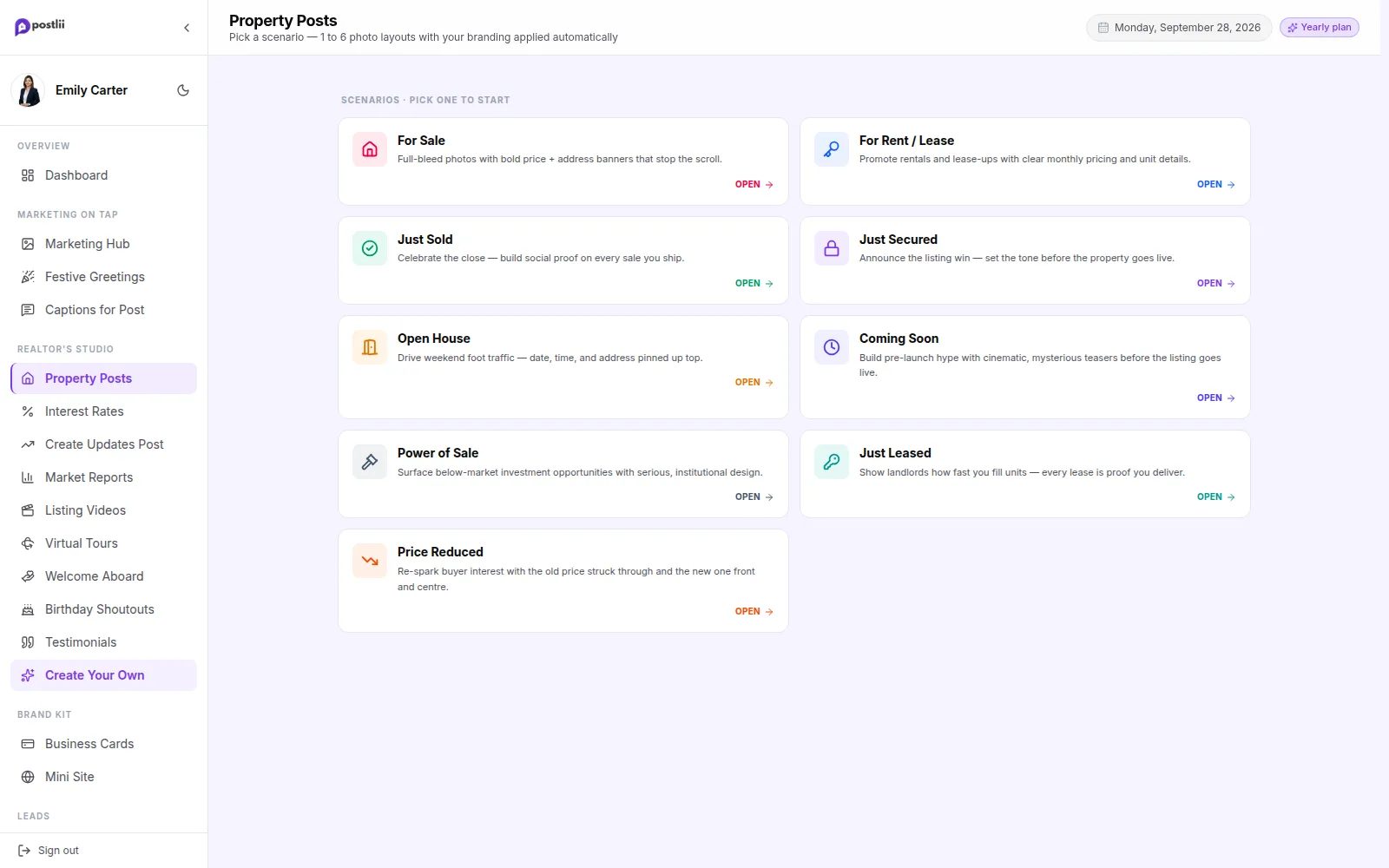
Property Post Maker

Make For Sale & Sold Posts Quickly

Add your listing photos and type the price and address. That's it. You get a post with your name, photo and brokerage already on it. No design software, no waiting for a designer and no AI mistakes to fix.

  • Every listing moment

    For Sale, For Rent/Lease, Just Sold, Just Secured, Open House, Coming Soon, Power of Sale, Just Leased and Price Reduced.

  • 1 to 6 photos

    Every layout fits the number of photos you have, from one main photo to a six-photo gallery.

  • Your details, added for you

    Your photo, name, phone, email and brokerage logo go in the branding bar of every design.

  • Sized for posting

    Downloads at 1080 × 1350. This tall size shows biggest in the Instagram and Facebook feed.

See How Property Post Maker Works
Property Post Maker in the postlii app
Feature Sheets

Branded Feature Sheets for Every Showing

Give buyers something to take home from every showing. Pick a design. Choose a saved listing or type the details. Then download a one-page feature sheet (US Letter size) with the photos, price, rooms, highlights and your contact details.

  • Made from your listing

    Pick a listing from My Listings. The address, price, rooms, description and photos fill in.

  • Light or dark

    Every design comes in a light and a dark version. Switch with one tap.

  • Your branding and colours

    Your photo, logos and contact details, in your brokerage colours or a standard look.

  • PDF or image

    Download a sharp PDF file (300 DPI) for any printer, or an image to share.

See How Feature Sheets Works
What's Nearby

Show Buyers What's Nearby

Open What's Nearby on a saved listing or a Client Hub home. You see the closest schools, transit, food, parks, shopping, groceries and highway ramps. Each one shows a walk or drive time on a small map. Turn it into a branded post slide with one tap.

  • The essentials around a home

    Schools, transit, food, parks, shopping, groceries and highway ramps, nearest first.

  • Walk or drive times

    Each place shows about how long it takes to get there.

  • A small map

    Pins on a simple map, so clients can see where everything is.

  • Make a post slide

    Turn the list into a branded 1080 × 1350 slide for your feed.

See How What's Nearby Works
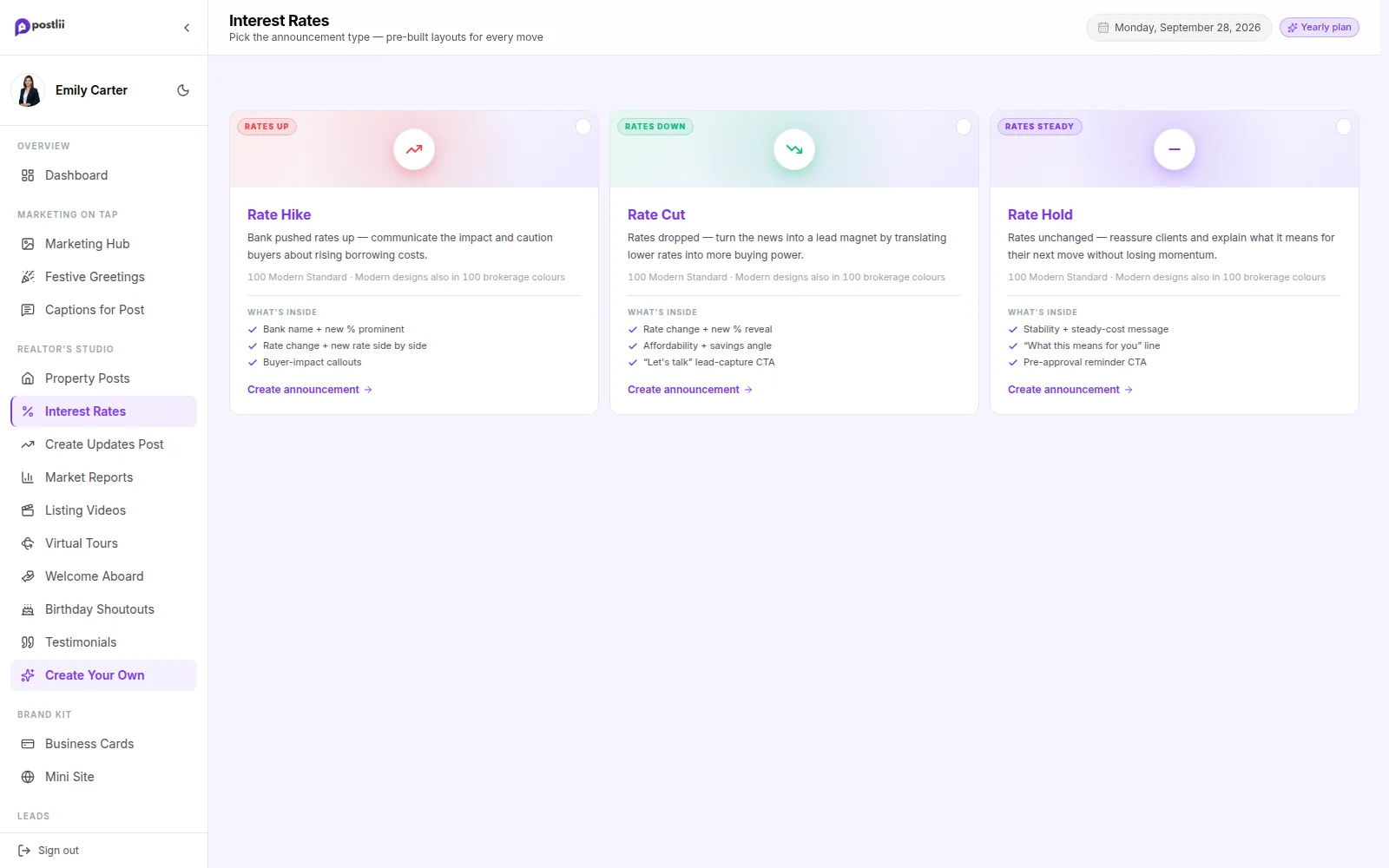
Interest Rates

Post Bank of Canada Rate News Fast

When the Bank of Canada changes its rate, your followers want to know what it means. Pick a design, type the new rate and post it the same day.

  • Cut, Hike or Hold

    A separate set of designs for each Bank of Canada decision. Each has its own arrows, colours and wording.

  • Just type the numbers

    Change the policy rate and the prime rate, and the whole design updates.

  • Brokerage colours

    Switch to your brokerage's colours with one tap, so posts match your office.

  • Modern and classic styles

    Photo panels, rate badges, charts and magazine-style layouts, in many colour styles.

See How Interest Rates Works
Interest Rates in the postlii app
Market Reports

Turn Market Numbers into a Branded Report

Pick your province, city, home type and month, and what to compare with. postlii fills in the numbers from your board's monthly report. You get a carousel (a post with several slides) with price and sales charts, a video post with music, a ready caption and a report page you can share.

  • Reads your board's report

    Load your board's report with one tap, paste the link or upload the PDF. Check or change any number.

  • Compare over time

    Compare this month with last month, last year or the last three years. Add Bank of Canada rates if you like.

  • Charts made for you

    Price trend, sales compared with new listings, and a gauge that shows a buyer's or seller's market. All in your chosen colours.

  • Carousel plus caption

    Download every slide at 1080 × 1350 in one ZIP file (one download with all the files). A caption is written from your numbers.

See How Market Reports Works
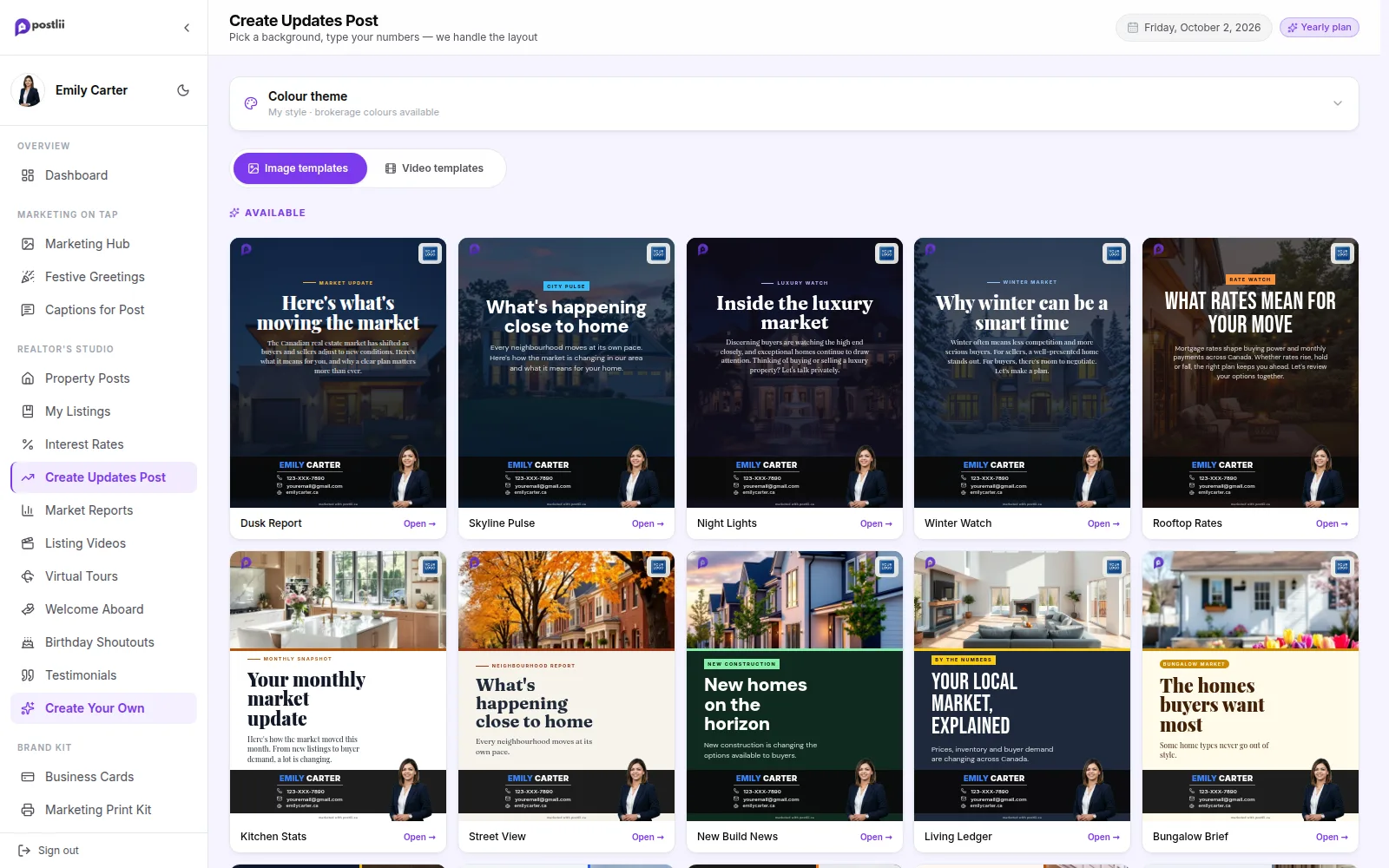
Create Updates Post

Share Clear Market Updates

Share the numbers buyers and sellers care about, like average price, number of sales and days on market. Your post looks clean and professional.

  • Key numbers

    Average price, change from last month, number of sales and days on market.

  • Photo or clean layouts

    Real estate photos or clean number layouts. Pick the one that suits your brand.

  • Always your branding

    Your branding bar with your photo and contact details is added to every update.

See How Create Updates Post Works
Create Updates Post in the postlii app
Virtual Tours

Make Your Own 360° Virtual Tours

Make a virtual tour of your listing from your phone or any device. Upload 360° photos or phone panoramas. Tap to add arrows between rooms. Then share one branded link, an MLS-ready link, a QR code, or a code to put the tour on your website.

  • Use any phone

    Use a 360° camera, or your phone's own panorama mode. iPhone photos (HEIC) work too.

  • Tap to link rooms

    Tap a doorway and pick the next room. Buyers move through the home by tapping arrows.

  • Branded and MLS links

    A branded link with your photo, contact buttons and brokerage logo. Plus a plain link with no branding for MLS.

  • Share anywhere

    Copy the link, download a QR code for signs and flyers, or add the tour to your website.

See How Virtual Tours Works
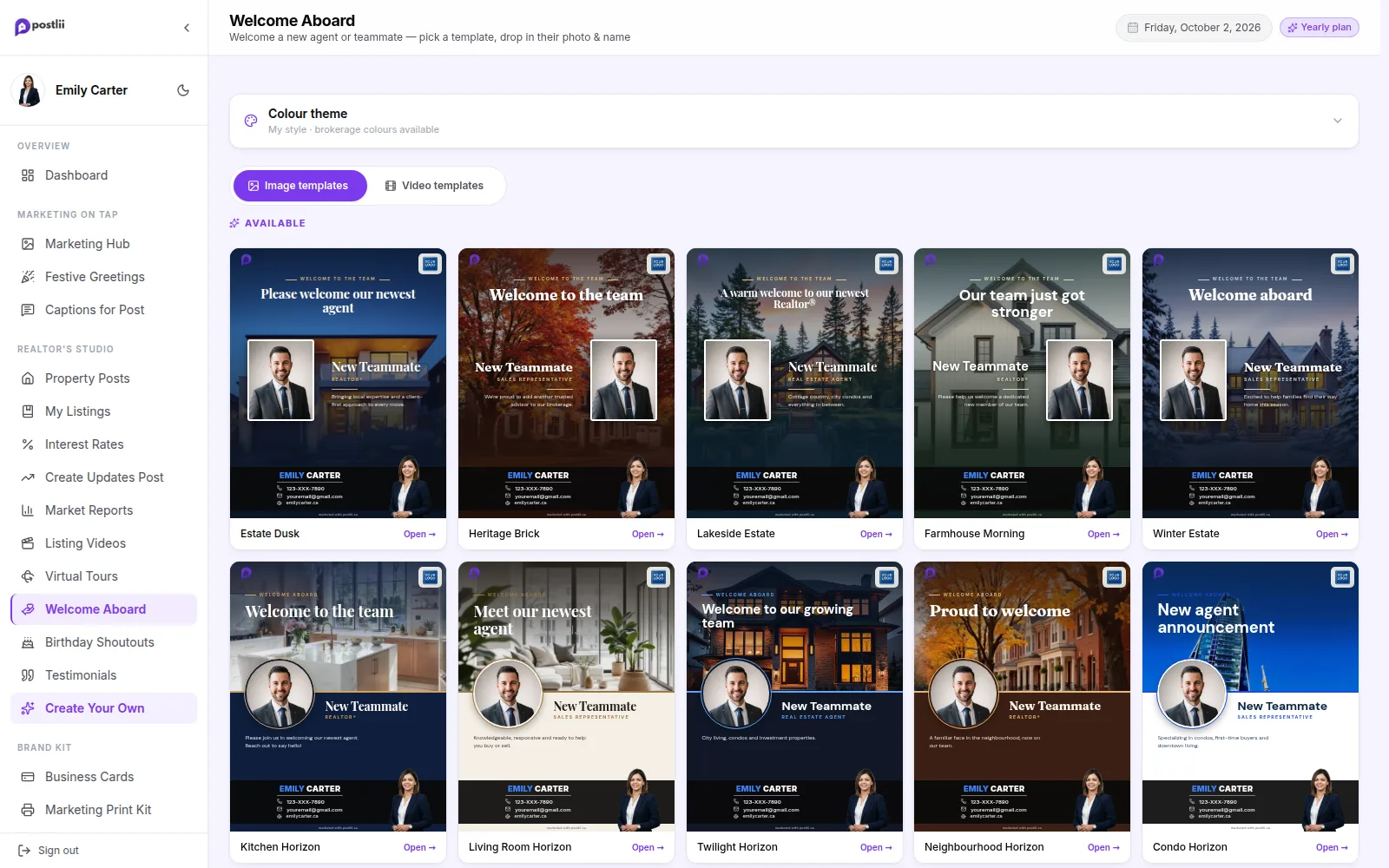
Welcome Aboard

Welcome New Clients & Agents

Growing your team? New client? Share it with a clean welcome post. It shows your business is growing.

  • AI cut-out photos

    Upload any photo. postlii removes the background, so the person sits cleanly on the design.

  • Team or client

    Wording for new teammates, new agents and new clients.

See How Welcome Aboard Works
Welcome Aboard in the postlii app
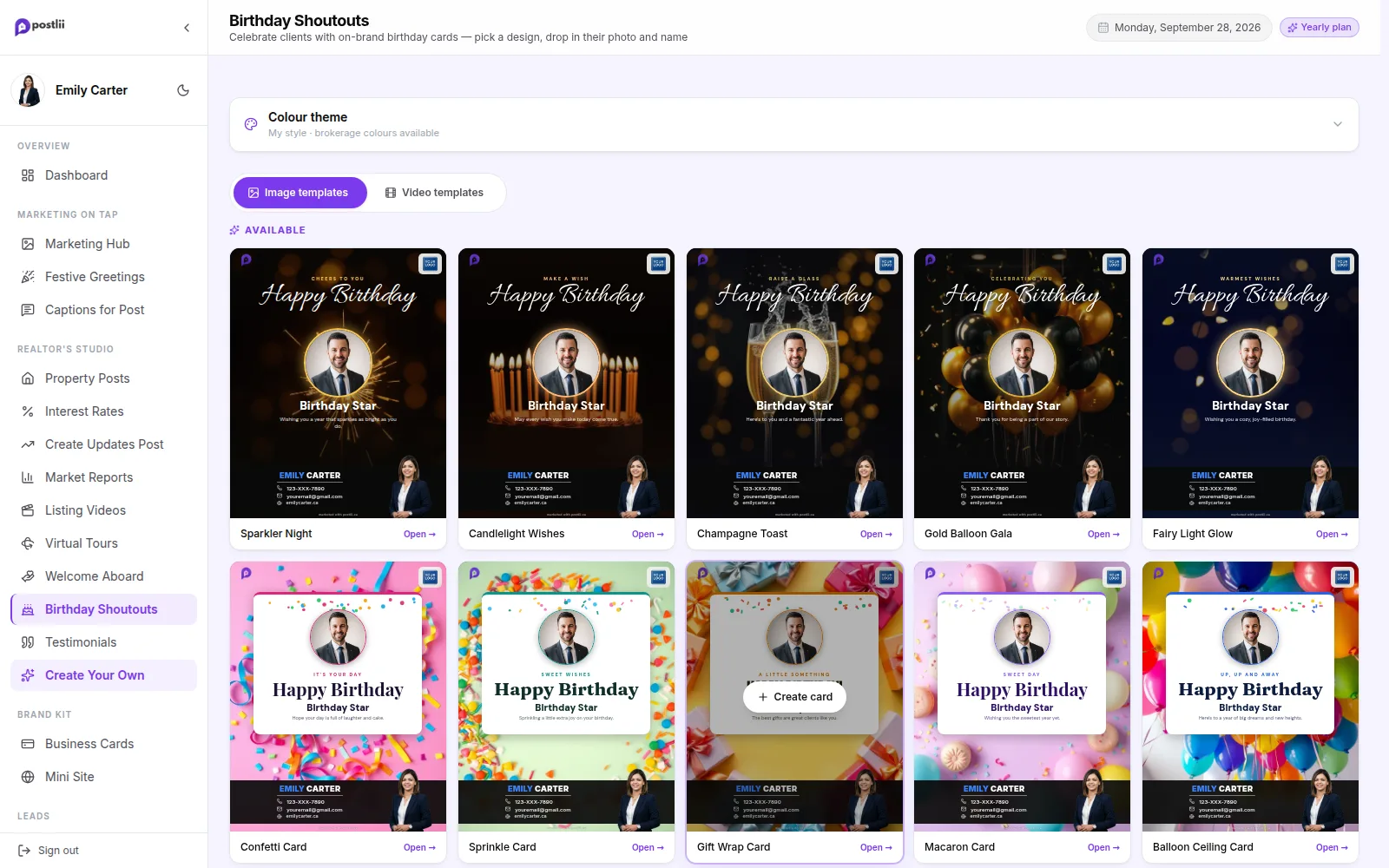
Birthday Shoutouts

Send Every Client a Birthday Shoutout

Past clients are your best source of referrals. A personal birthday shoutout takes 10 seconds with postlii. It reminds them who their realtor is.

  • Add their photo

    Add your client's photo and name. The design frames it for you.

  • Every mood

    Gold and elegant, bright and fun, or photo-style celebrations.

  • Repeat business

    Staying in touch with past clients is the cheapest way to win repeat business.

See How Birthday Shoutouts Works
Birthday Shoutouts in the postlii app
Testimonials

Turn Client Reviews into Branded Posts

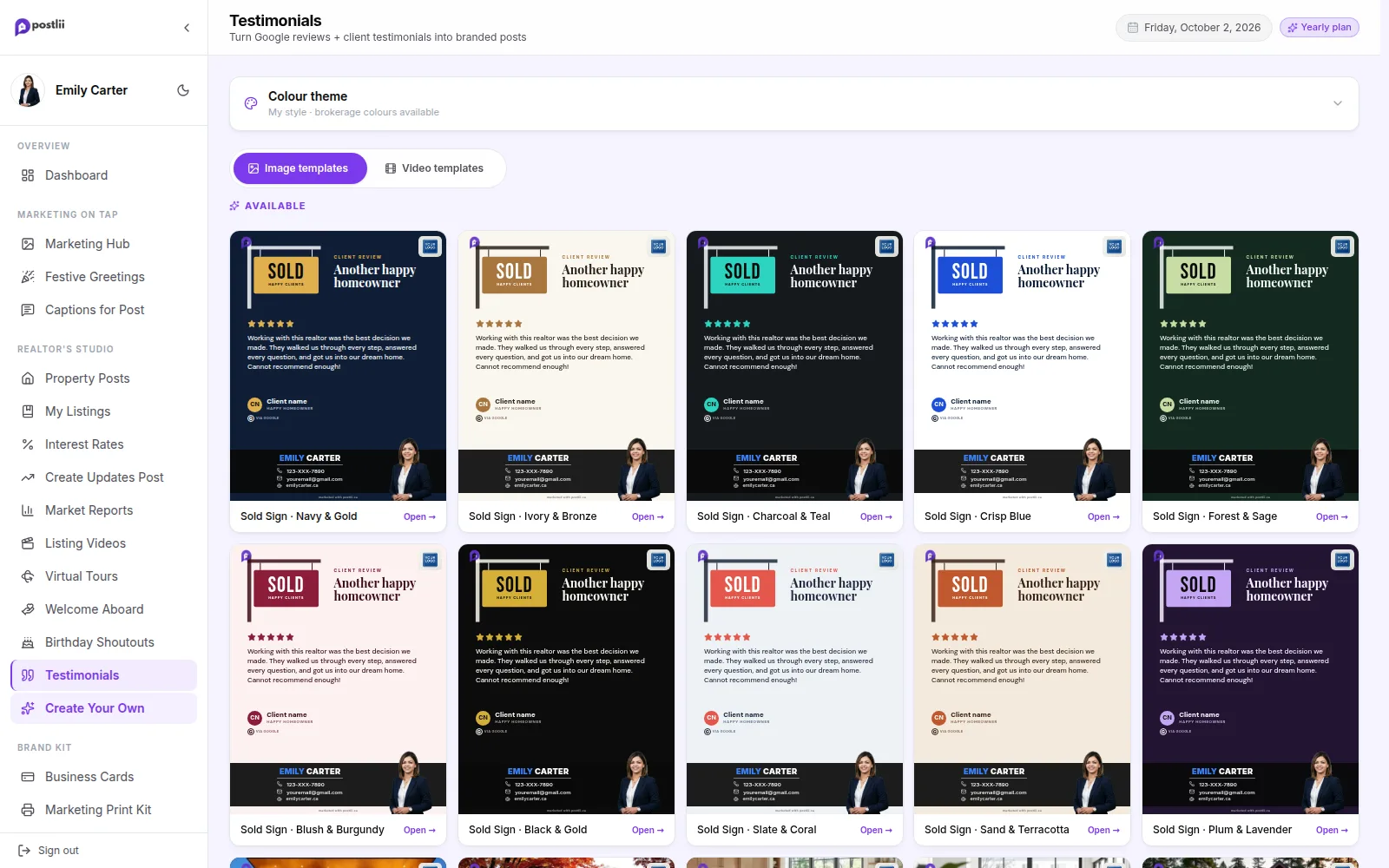
Happy clients are your best advertising. Paste a Google review and postlii turns it into a branded post. It builds trust with every buyer and seller who sees it.

  • Paste and post

    Paste the review and the client's name. The stars and layout are done for you.

  • Sold-sign styles

    Designs about the day a deal closes: SOLD signs, keys and homes.

See How Testimonials Works
Testimonials in the postlii app
Create Your Own

Add Your Branding to Any Image or Carousel

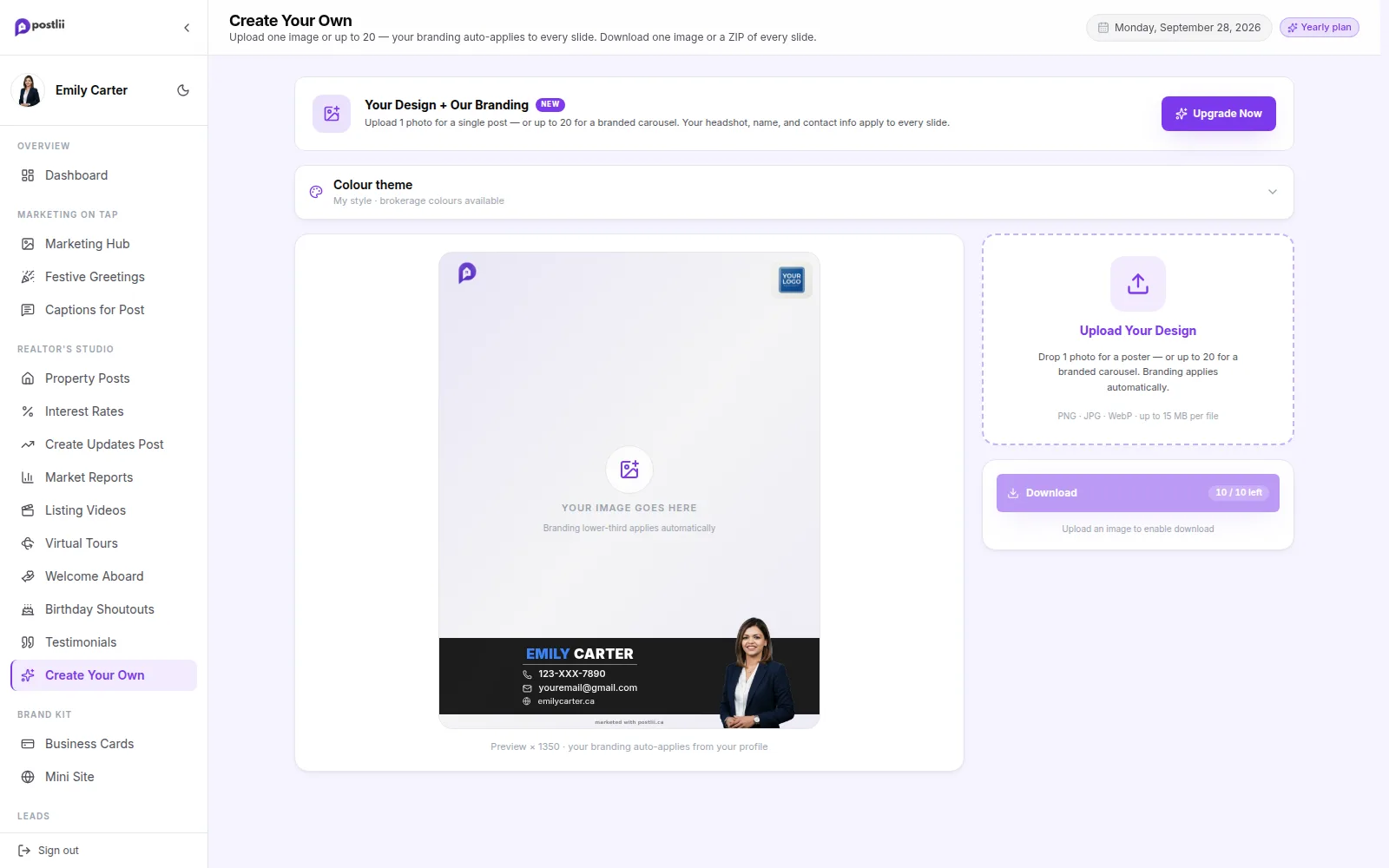
Made something in Canva or got a flyer from your brokerage? Upload it, or up to 10 images for a carousel. postlii adds your branding bar for you.

  • Single post or carousel

    One image or up to 10 slides, all with the same branding.

  • Works with any design

    Canva designs, brokerage flyers, photos: anything you upload.

See How Create Your Own Works
Create Your Own in the postlii app
Video Posts

Turn Your Sold & Rate Posts into Videos

Make a property post, a Bank of Canada rate post or a market update as usual. Then press Make video. Your design stays exactly the same while the words move in. Add a light sweep, sparkles, a gold frame and more, plus music. Your branding stays in place, and it downloads as a video file (MP4) ready for your feed.

  • Every Studio post

    Property posts (For Sale, Sold, Open House and more), interest rate posts and market updates.

  • Effects that fit

    Ten effects for each: light sweeps, spotlight rays, gold frames, sparkles, glitter, and confetti for a sale or a rate cut.

  • Music included

    Each effect comes with music that fades in and out. Or turn the music off.

  • Ready for your feed

    A 1080 × 1350 video file (MP4) with your branding in place. It is made on your device and downloads straight to you.

See How Video Posts Works
AI Voice-over

Add a Free AI Voice to Your Videos

A voice helps people watch your posts. Press "Create video with AI voice" and pick a female or male voice. postlii reads your post out loud over soft music while the words appear. No microphone, no recording and no extra cost.

  • Female or male voice

    Tap Play to hear each voice. Then pick the one you like.

  • It reads your post

    The voice follows what is on your design: the rate change, the market headline, the home's features.

  • Never says names or prices

    Names and prices are left out on purpose. So nothing personal or out of date is ever said out loud.

  • Soft music underneath

    The music plays quietly under the voice, so every word is clear.

See How AI Voice-over Works
Video End Card

End Every Video with Your Contact Card

Every video you download from postlii can end with a few seconds about you. Your photo, name, phone, email and logos, in your colours. Pick the design and motion once in My Branding. It is added to Marketing Hub, Festive and Studio videos.

  • Added for you

    Turn it on once. It is added to the end of your Marketing Hub, Festive and Studio videos.

  • A design that suits you

    Framed and full-photo layouts, from classic to magazine style.

  • Photo shape and motion

    Choose a round, square or full photo. Then choose how the card moves in: fade, rise, zoom, slide, wipe or pop.

  • In your colours

    Your brand or brokerage colours, your logos and your contact details.

See How Video End Card Works

Classic

Spotlight

Polaroid

Website & Brand Kit

Your Brand, Online & on Paper

Your mini website, business cards, print pages, social profiles and email signature. They all use your colours, logo, photo and details, so everything matches and people remember you.

See Everything in Website & Brand Kit
Business Cards

Realtor Business Cards, Ready to Print

Keep your branding the same everywhere, so you always look professional. Your details are already in postlii, so your business card is ready too. Pick a design and download a PDF file for any online or local print shop.

  • Print-ready PDF

    Standard 3.5" × 2" size, sharp enough to print (300 DPI), with clean edges. Upload it straight to your printer.

  • Wide or tall

    With your photo or text only, in dozens of layouts.

  • Brokerage colours

    Change every design to your brokerage's light or dark colours with one tap.

  • Always up to date

    Change your phone number once and every card is updated.

See How Business Cards Works
Marketing Print Kit

Print Branded Letters, Tip Sheets & Checklists

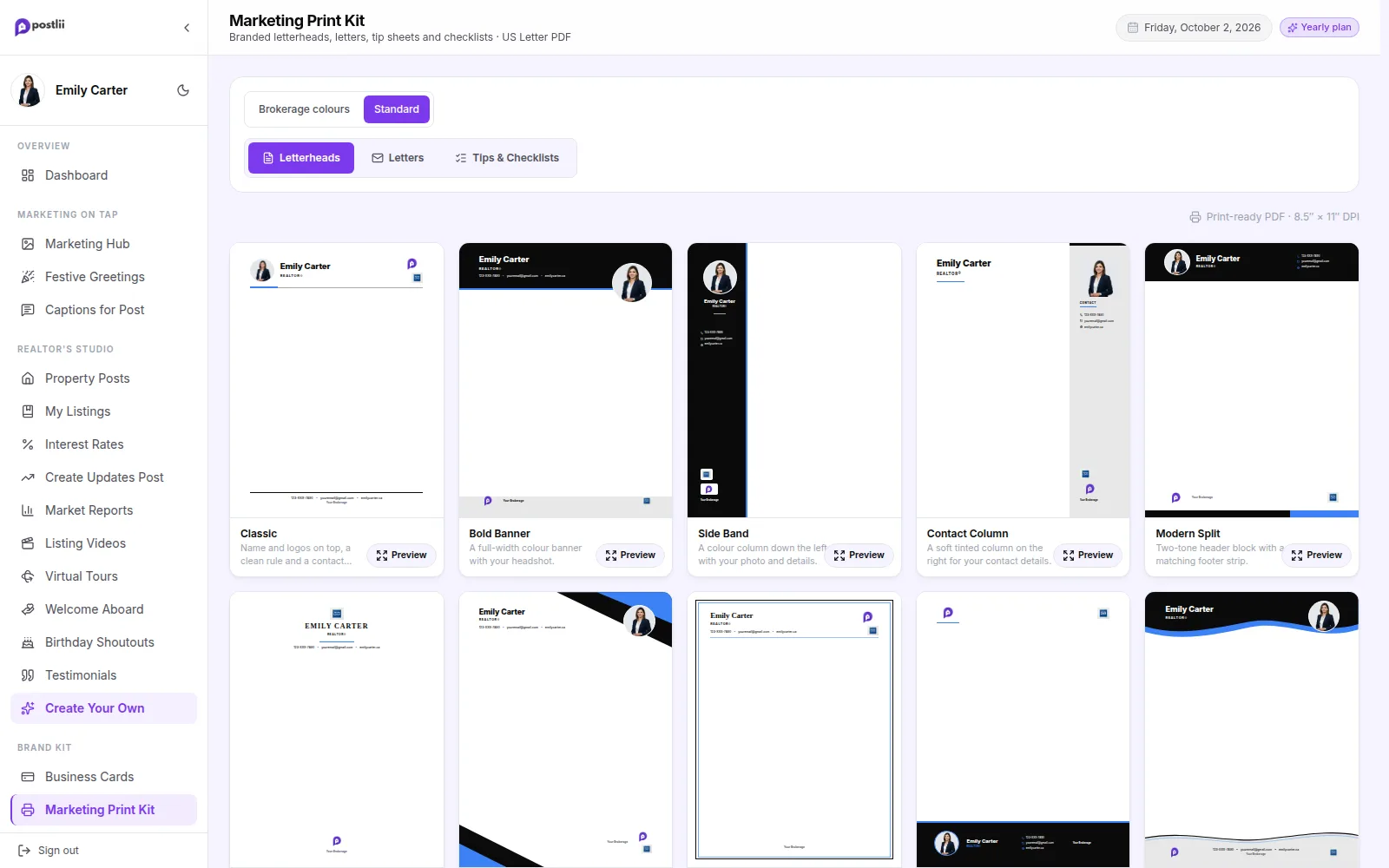
Keep your branding the same everywhere, so you always look professional. Print branded letterheads, letters for sellers, buyers and neighbours, and one-page tip sheets and checklists. Hand them out at open houses, showings and when you knock on doors. Your details, photo and colours are already on every page.

  • Branded letterheads

    Classic, bold, minimal and more, with your photo, logos and contact details. Print a blank page or use it in Word.

  • Letters already written

    Why list with me, why buy with me, expired listing, for sale by owner, just sold, home evaluation, referral thank-you and more.

  • Tips & checklists to hand out

    Buying and selling tips, buyer and seller checklists, a first-time buyer guide, and open house, staging and moving checklists.

  • Change any word

    Edit any line. Blanks like [address] are highlighted, so you never print one by mistake.

See How Marketing Print Kit Works
Marketing Print Kit in the postlii app
Social Profile Kit

Matching Covers for Every Social Profile

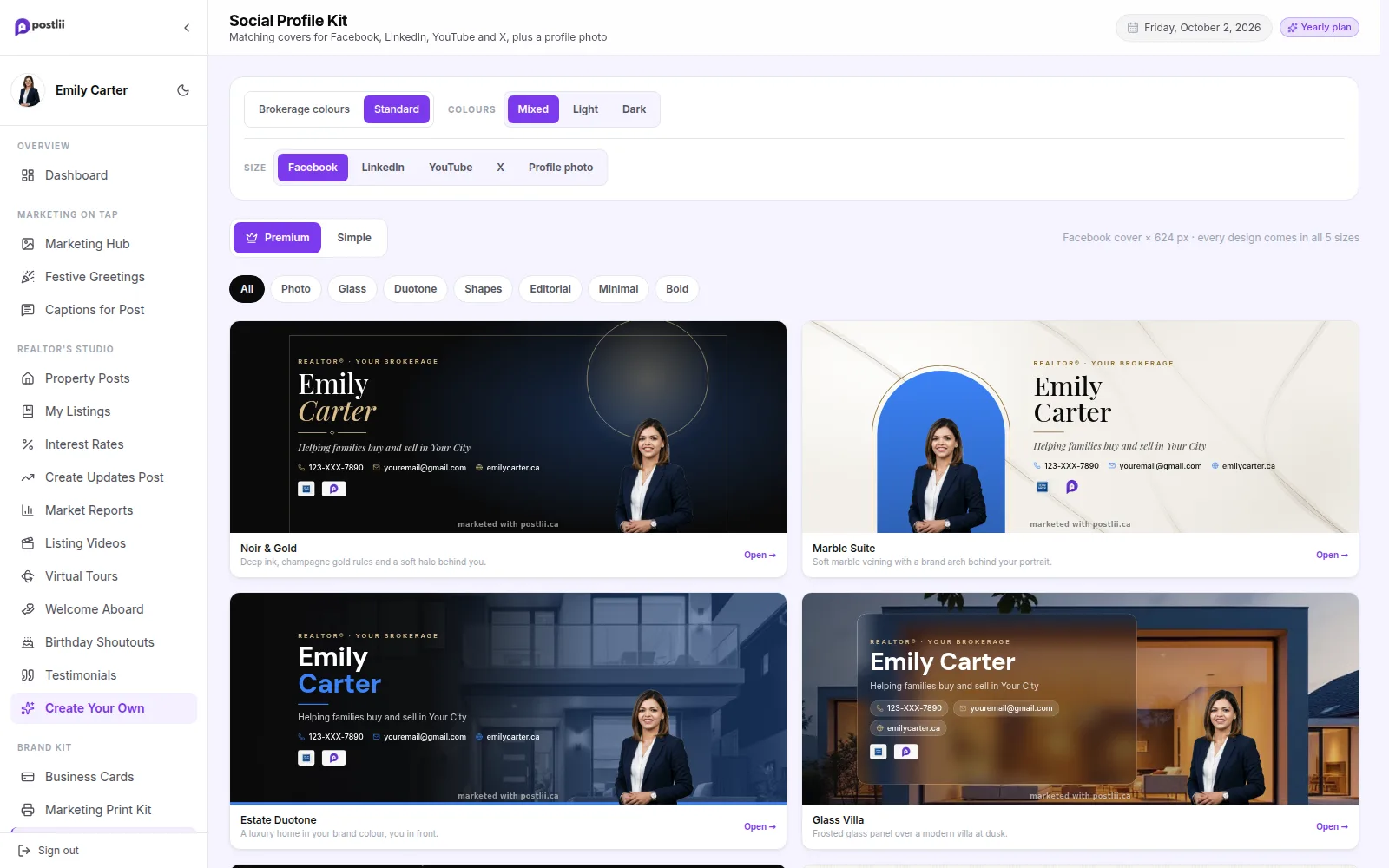
Keep your branding the same everywhere, so you always look professional. Your profiles are the first thing a client checks. Pick a design and get a Facebook cover, LinkedIn banner, YouTube banner, X header, a profile photo and a 4:5 post. They all match and all have your branding. Download one, or all six in one ZIP file.

  • Premium designs with your photo

    Luxury looks with your full headshot placed on the left, the right or in the centre.

  • Simple designs too

    Clean layouts with your photo in a circle or shape.

  • Every platform size

    Facebook cover, LinkedIn banner, YouTube banner, X header and a profile photo frame.

  • Safe on every screen

    Your name and details stay clear of each platform's own profile photo and the parts phones cut off.

See How Social Profile Kit Works
Social Profile Kit in the postlii app
Email Signature

An Email Signature That Matches Your Branding

Your email signature is the name card at the end of every email. postlii makes it for you, with your photo, logo, colours and contact details already in. Copy it into Gmail, Outlook or Apple Mail in about a minute.

  • Already filled in

    Your photo, name, phone, email, logo and colours come from your Brand Kit.

  • Five styles

    Classic, Modern, Minimal, Bold & Banner and Luxury. Pick the one you like.

  • Works in your email app

    Copy and paste it into Gmail, Outlook, Apple Mail or your iPhone.

  • Extras if you want them

    Add a button, your social links or a QR code to your website or Mini Site.

See How Email Signature Works
Mini Site

Your Own Realtor Website in One Link

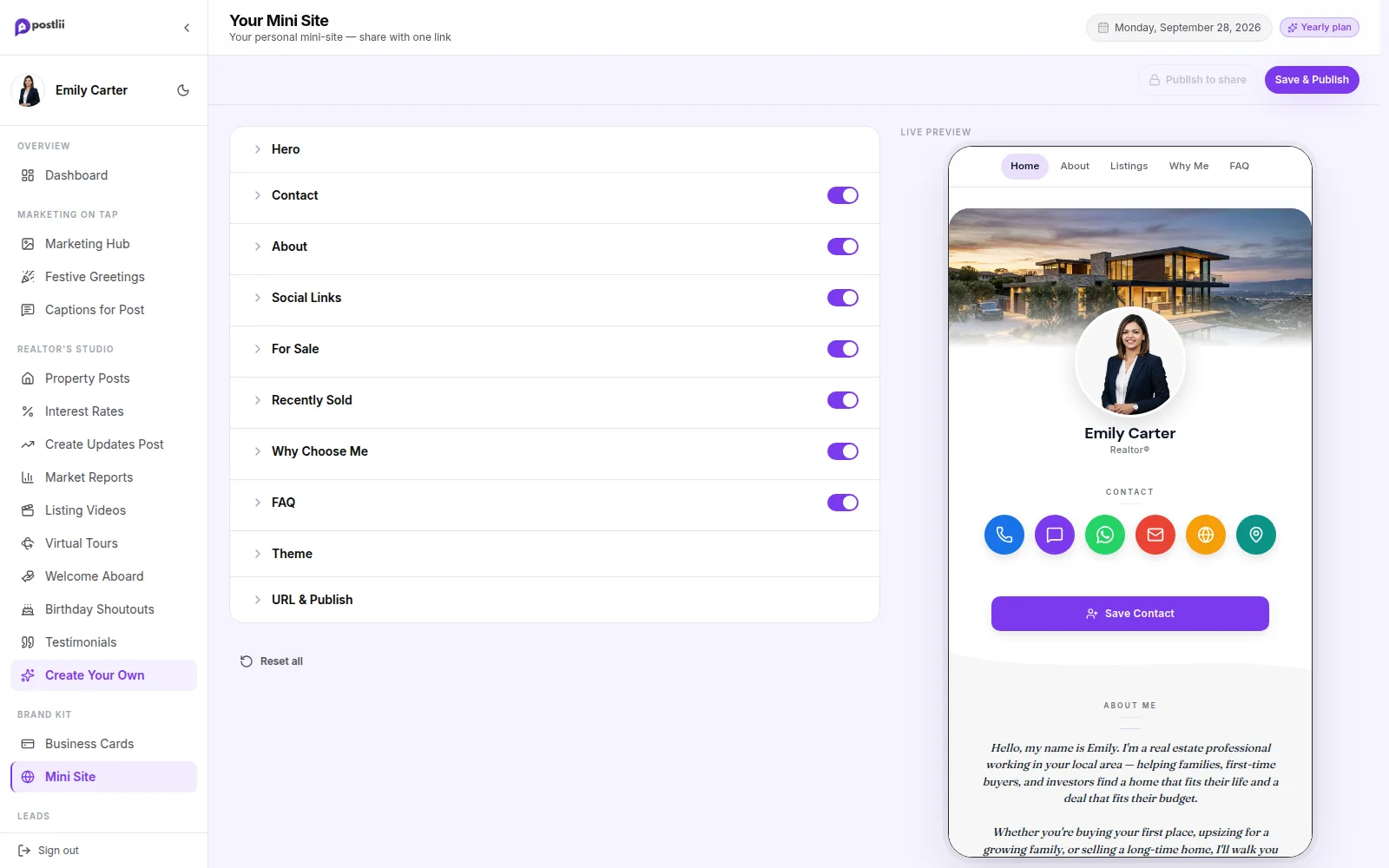
Keep your branding the same everywhere, so you always look professional. Share one link in your Instagram bio, email signature and business card. Your mini site shows who you are, your listings, your recent sales and how to reach you.

  • Why list & Why buy with me

    Ready-written reasons for sellers and for buyers, in your own words, with a button to call you. Show one side or both.

  • Built from your profile

    Your photo, bio, contact buttons and social links fill in for you.

  • Listings and sales

    Show what you are selling now and what you have sold recently.

  • Save to contacts

    Visitors add you to their phone's contacts with one tap.

See How Mini Site Works
Mini Site in the postlii app
Brand Kit & AI Cut-outs

Set Your Branding Once, Use It Everywhere

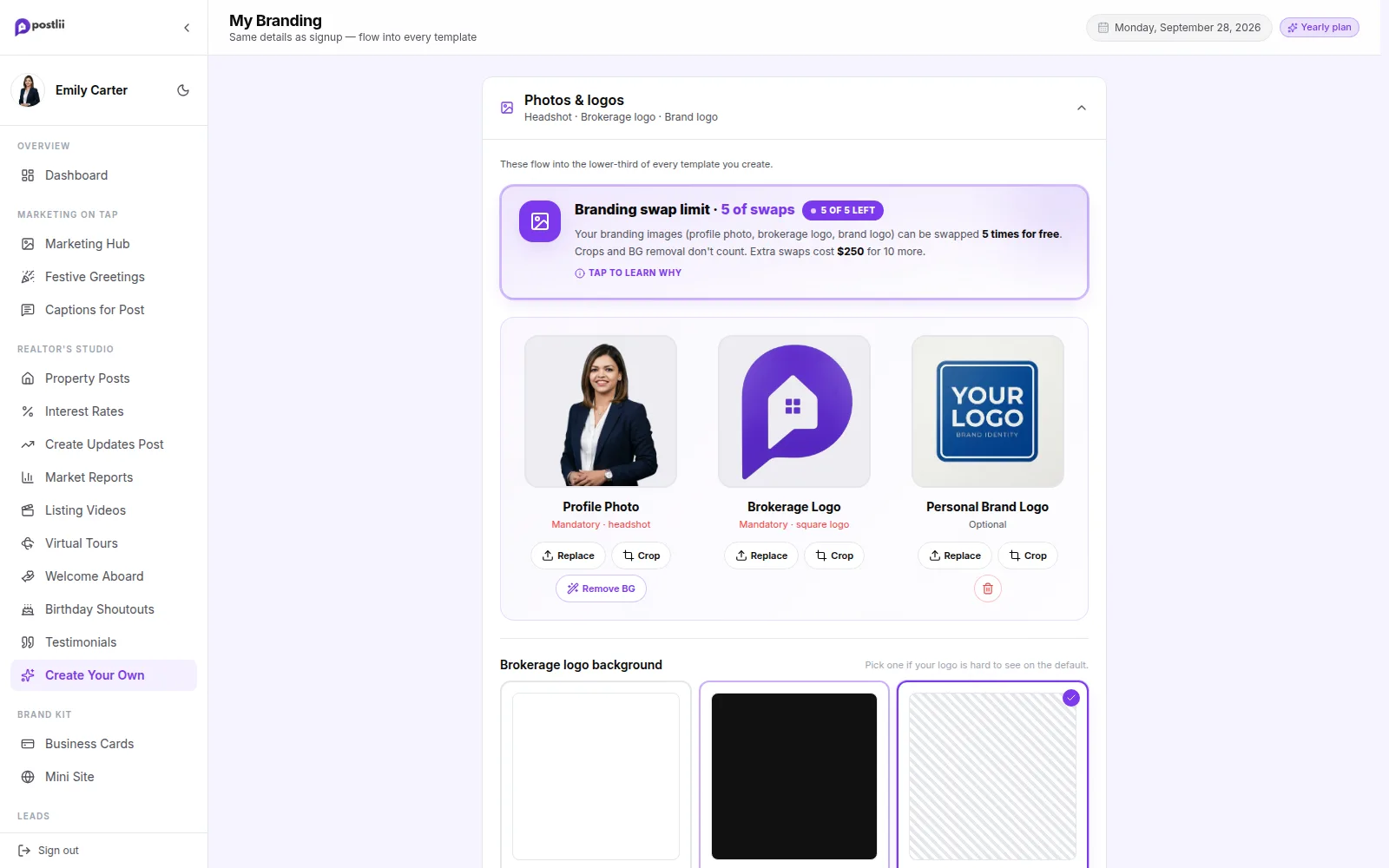
Keep your branding the same everywhere, so you always look professional. Upload your photo and logos once. postlii removes your photo's background with AI. Then it puts your branding on every template, card and page for you.

  • Branded QR codes

    QR codes in your brand colour, with your logo or photo in the middle. On signs, links, tours and print.

  • AI background removal

    A clean cut-out of your photo in one click. No Photoshop needed.

  • Matching colour themes

    Add your brokerage logo and colours in a minute. postlii can suggest colours that match your logo, or use your own.

  • Many branding bar styles

    Choose how your name and contact details sit on each design, in the colour theme you like.

See How Brand Kit & AI Cut-outs Works
Brand Kit & AI Cut-outs in the postlii app
My Variations

Pick the Look of Your Branding Bar

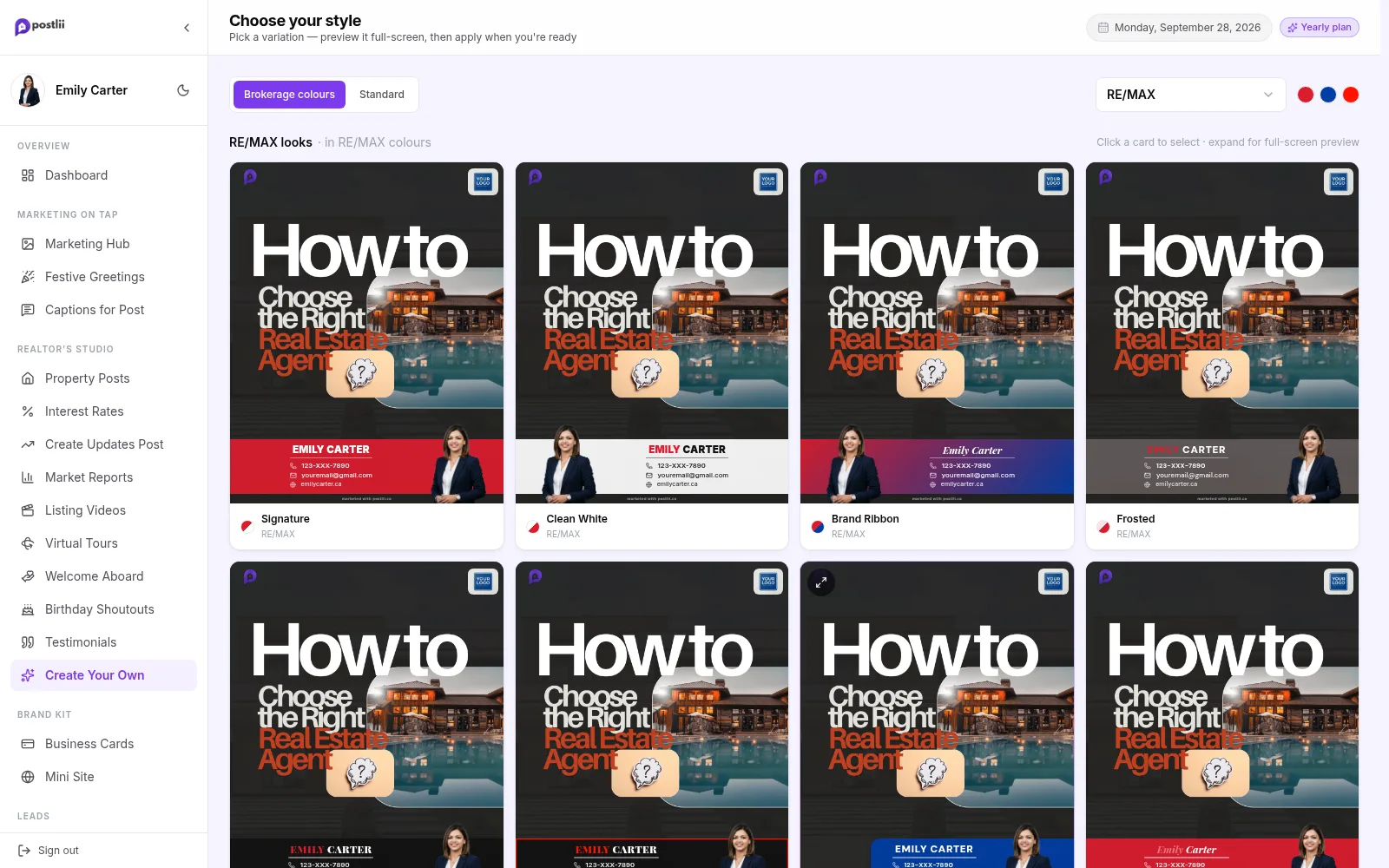
Your branding bar is the strip with your photo, name, brokerage and contact details on every design. Pick its layout and colours once in My Variations, and every post, video and print piece uses it. Change it any time.

  • About 100 layouts

    Classic, modern, framed and photo-first branding bars to suit your style.

  • Colours for each one

    Most layouts come in 5 colour themes. Pick the one that suits you.

  • Set once, used everywhere

    Your pick goes on every post, video and print piece you make.

  • Change it any time

    Try a new look whenever you like. Your next designs use it.

See How My Variations Works
My Variations in the postlii app
Branded QR Codes

Make QR Codes in Your Brand Colour

Keep your branding the same everywhere, so you always look professional. Open house signs, Deal Tracker and Client Hub links, virtual tours and print pieces all come with a QR code (a square code people scan with their phone camera). Choose the look once: your brand colour, with your brokerage logo, your own logo or your photo in the middle. Every code then uses it.

  • Your colour

    Codes use your brand colour. It is made darker when needed, so phone cameras can still read them.

  • Logo or photo in the middle

    Your brokerage logo, your own logo, your photo, or nothing at all.

  • Dot style

    Square, rounded or dotted, to match the rest of your branding.

  • One setting, everywhere

    Used on open house signs, Deal Tracker, Client Hub, virtual tours and the Print Kit.

See How Branded QR Codes Works
Client Hub & Leads

Open House Leads & Buyer and Seller Hubs

Give each buyer and seller their own private page, so buying and selling feel easy and they always know what's next. Turn open house visitors into leads and follow every deal on one timeline.

See Everything in Client Hub & Leads
Buyers Hub

Stand Out in Your Buyers' Eyes

Give each buyer one private page in your branding. They shortlist homes, see showings by day with directions, react to each home and ask questions, so buying feels easy and they always know what's next.

  • Send you homes they find

    Buyers paste a listing link or type an address. The same home added twice becomes one card.

  • Shortlist and showings

    Tabs for Interested, Shortlisted, Showings and Final shortlist, with showings sorted by day.

  • Liked, Maybe or No

    Each partner reacts to shortlisted homes and leaves a note under their own name.

  • Questions on each home

    They ask on the home's card and see your answer right under it.

See How Buyers Hub Works
Sellers Hub

Stand Out in Your Sellers' Eyes

Give each seller one private page in your branding. They see every showing, open house visitor counts and the marketing you have done, and answer buyers' questions without the back-and-forth.

  • Next showing and when to leave

    The next showing with the time to tidy up and leave by.

  • Every showing, tracked

    Showings so far and upcoming, with the buyer agent's brokerage only.

  • Open house visitor counts

    How many people came to each open house. Never their names.

  • All your marketing

    Listing, posts, videos, tours and more, each one ready to preview.

See How Sellers Hub Works
Open House Leads

Collect Open House Leads with a QR Code

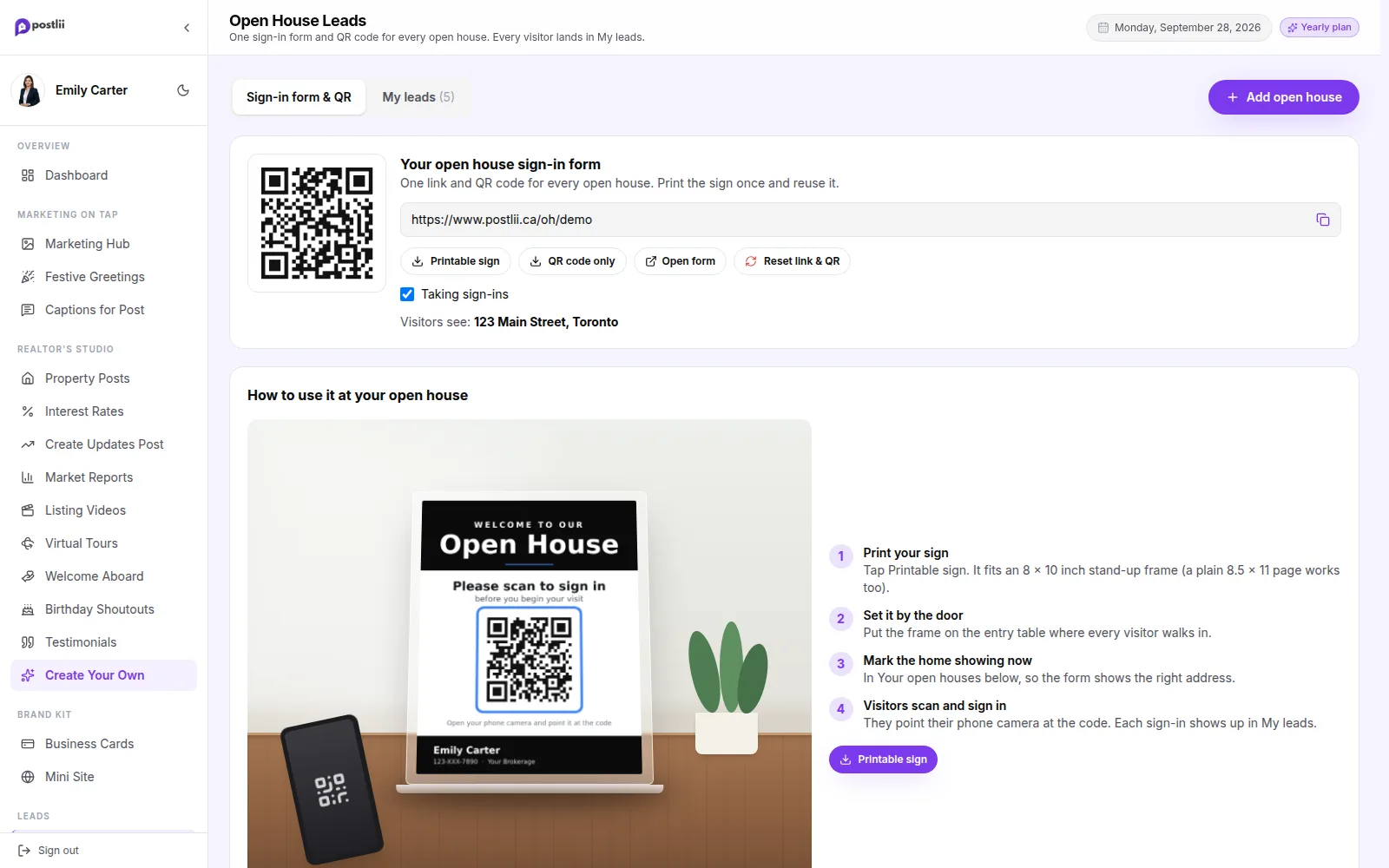
Put one QR code sign out at every open house. Visitors scan it and check in on their own phone. They give their name, email and phone, and say if they already have a realtor. Each check-in goes into your leads list, with the home they came to see.

  • One QR code, forever

    Your form link and QR code never change. Print the sign once and use it at every open house.

  • A QR code for each home too

    Each open house also gets its own link, QR code and sign. They always open the form for that address.

  • Your branding

    Visitors see your photo, name, brokerage logo and colours. Team accounts show both agents.

  • Every lead has its address

    Mark which open house is showing now. Each check-in is saved with that address.

See How Open House Leads Works
Open House Leads in the postlii app
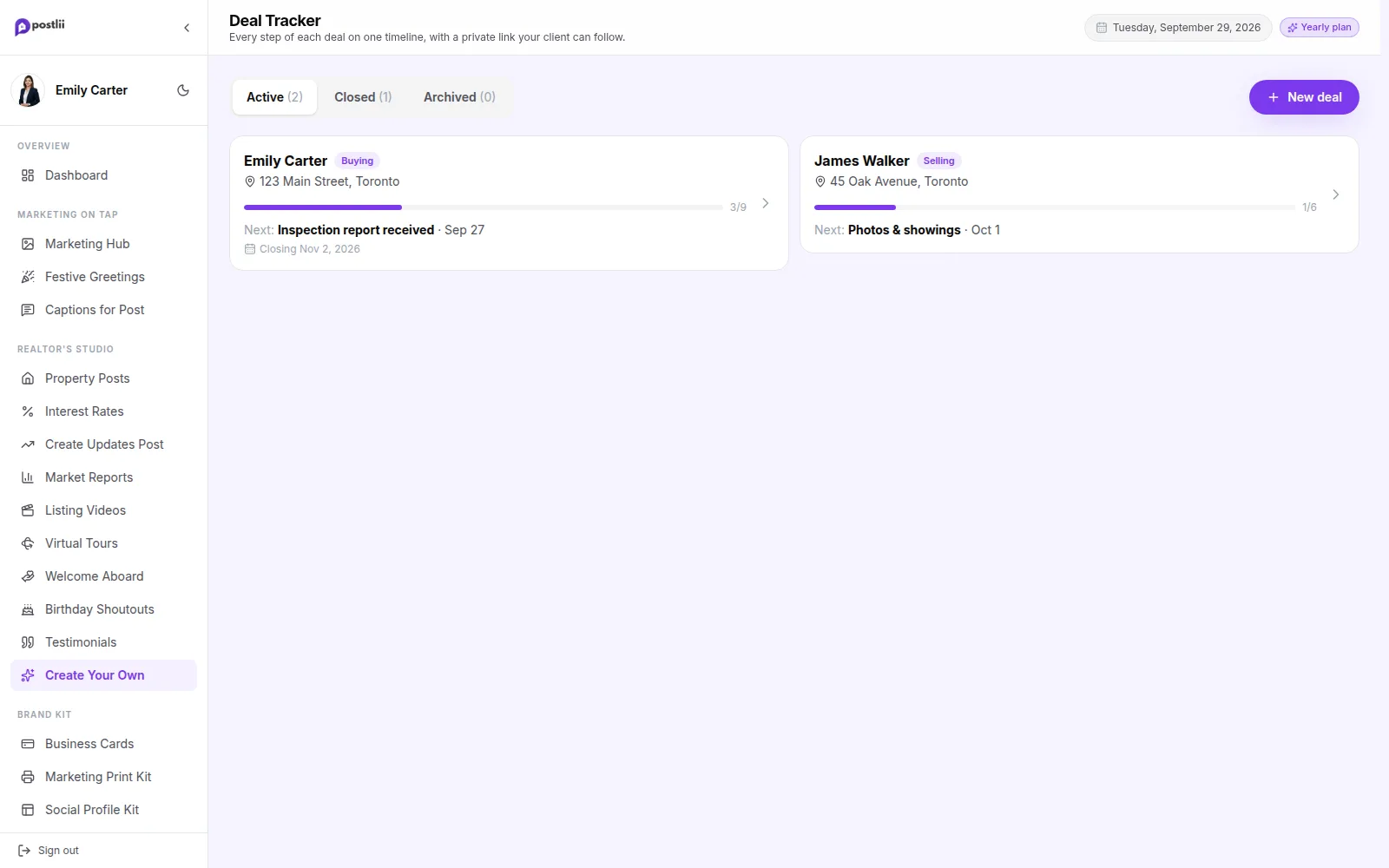
Deal Tracker

Show Clients Every Step of Their Deal

Offer accepted, inspection, financing, closing day. Tick each step when it happens. Your client follows along on their own private page, with your branding. You get fewer "any news?" calls, and clients feel cared for.

  • Steps ready for every deal

    Buying, selling and leasing deals start with the usual steps, in Canadian terms. Add, remove, rename or reorder any step.

  • Dates and notes

    Give each step a date and a short note, like "Inspector: 9 AM. I'll meet you there."

  • A private page for your client

    Share one private link or a QR code. No login and no app. It shows only their first name, the address and the steps.

  • In your branding

    Your photo, colours and brokerage are on the page, with Call, Text and Email buttons.

See How Deal Tracker Works
Deal Tracker in the postlii app
Relationship Builder

Past Clients Hear from You on Their Big Days

Add your past clients once. postlii emails them on their birthday, on the anniversary of the day they bought their home, and before their mortgage renews. Rate news and festival wishes go out too. Every email is in your branding, so you stay the realtor they remember.

  • Birthdays

    A birthday email on the day, with their name, in one of many birthday designs.

  • Home anniversaries

    Every year on their closing date: "Happy 2nd Home Anniversary, David!"

  • Mortgage renewals

    Reminders 120, 90 and 30 days before their renewal date, so they call you first.

  • Rate news and festivals

    Bank of Canada rate news with that day's numbers, and wishes on the festivals you pick.

See How Relationship Builder Works
  • Birthdays

    A birthday email on the day, with their name, in one of many birthday designs.

  • Home anniversaries

    Every year on their closing date: "Happy 2nd Home Anniversary, David!"

  • Mortgage renewals

    Reminders 120, 90 and 30 days before their renewal date, so they call you first.

  • Rate news and festivals

    Bank of Canada rate news with that day's numbers, and wishes on the festivals you pick.

  • One email a day at most

    If two occasions fall on the same day, they get one email with both.

  • Unsubscribe built in

    Every email has an unsubscribe link and keeps a record of each client's consent.

Email Campaigns

Stay Top of Mind with Branded Emails

Stay in touch with past and future clients. Build branded emails with your photo and colours, and send them to your contact lists from postlii.

Email Campaigns

Send Branded Email Campaigns

Reach your clients by email, not just on social media. Build a branded email from blocks, import your contacts and send. You never have to leave postlii.

  • Build with blocks

    Headings, text, images and buttons. Build a clean email in minutes.

  • Contacts

    Import and manage your contacts: people you know, past clients and leads.

  • Templates and history

    Start from a template and see everything you have sent.

  • CASL consent records

    Record how and where each contact agreed to hear from you, for CASL (Canada's anti-spam law). Implied consent gets its end date. Contacts without valid consent are skipped when you send.

See How Email Campaigns Works
Social Posting

Plan Once, Post Everywhere

Connect Instagram, Facebook, TikTok, LinkedIn and more once. Plan your posts on a calendar with Canadian holidays and festivals marked, and postlii posts each one at its set time.

Social Scheduler

Schedule Your Posts Up to 90 Days Ahead

Connect Instagram, Facebook, TikTok, LinkedIn and more. Plan branded posts up to 90 days ahead, and postlii posts each one at its set time.

  • Calendar and queue

    A month view, a list of upcoming posts and a record of everything you have prepared.

  • Festivals and holidays

    Canadian and cultural dates are marked, so you can plan greetings early.

  • Plan up to 90 days ahead

    Posts fill your posting times, up to 90 days ahead.

  • Posts for you

    Connect Instagram, Facebook, TikTok, LinkedIn and more. Each post goes out at its time.

See How Social Scheduler Works
Social Scheduler in the postlii app
Who It's For

Built for Single Agents, Teams & Brokerages

Sell on your own, with a partner, or run a brokerage. Everyone gets the same tools, with the right names, photos and logos on every design.

Single or Team Agents

Put Both Team Agents on Every Post

Do you sell with a partner? A postlii Team account shows both of you on every post, video and business card. Each agent has their own photo, name, phone and email. You share the website, logos and brokerage colours. One login, set up once.

  • Both agents on every design

    Each agent's photo, name, phone and email sit side by side on the banner of every post.

  • One shared login

    One account for the team. Either of you can make, download and post.

  • Shared website, logos and brokerage

    Set your team website, logos and brokerage colours once. Every design uses them.

  • Each agent's own details

    Each agent keeps their own photo and contact details, and can update them in Our Branding.

See How Single or Team Agents Works
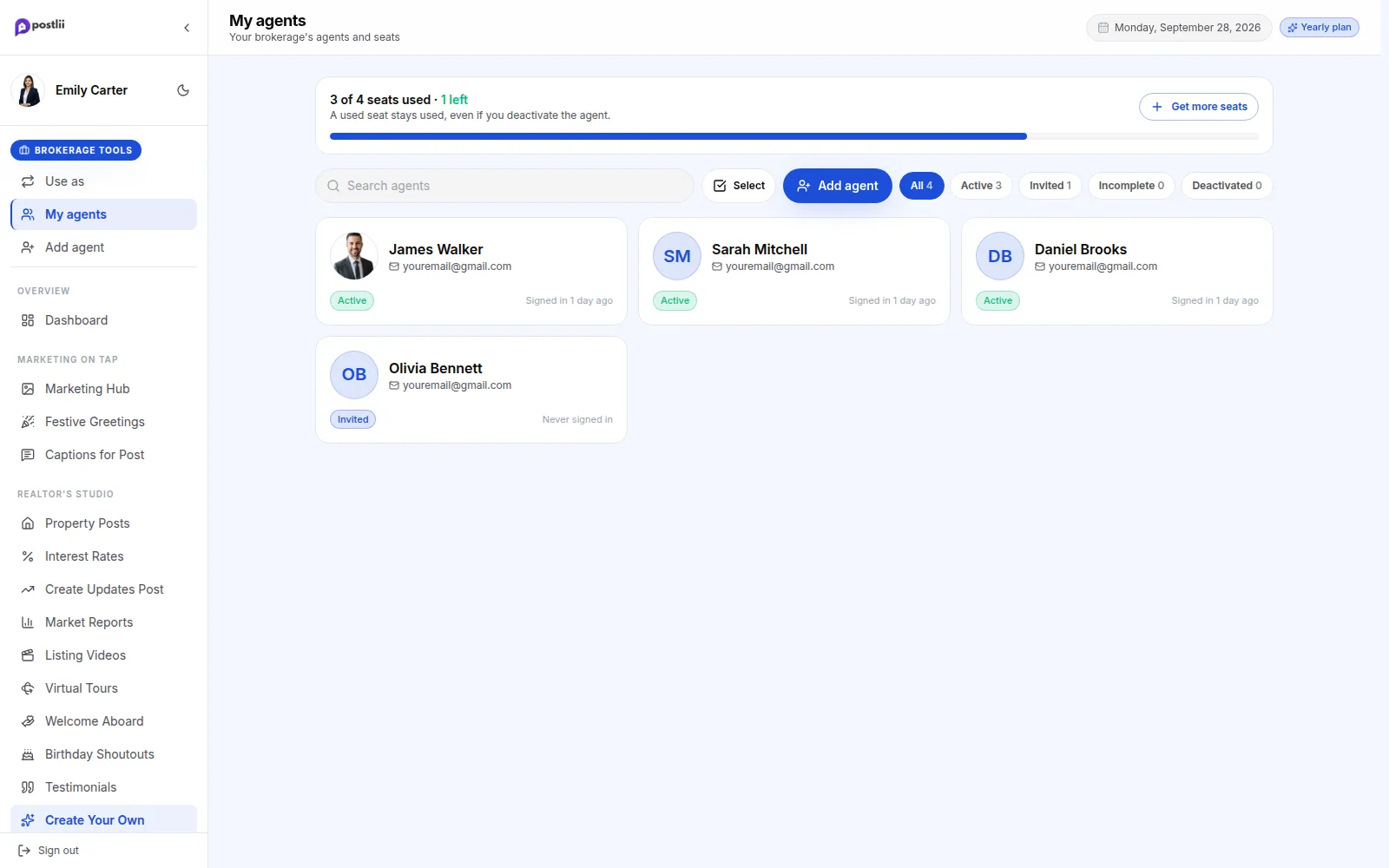
For Brokerages

Give Every Agent Your Brokerage's Look

Why pay for a different tool for every job? Posts, videos, tours, reports, mini sites and emails are all in one place. For you and every agent you add.

  • Your own brokerage marketing

    Everything a single agent gets, with your brokerage logo, colours, photo and contact details.

  • Team marketing with any agent

    Switch to team mode and make designs with you and one of your agents side by side.

  • Put your brokerage on every agent's post

    Agents post in your brokerage's look, so everything they share shows your brand.

  • Each agent gets their own space

    Ready-to-post designs, their own mini site and email campaigns, with their own photo and details.

See How For Brokerages Works
For Brokerages in the postlii app

See It with Your Own Branding

Start your 7-day free trial. No credit card needed.